
Microsoft Purview Portal — Role Groups

The “Global Admin” Trap
If you are using default Entra ID roles to manage Purview, you are likely non-compliant.
The most common mistake we see in audits is the “Over-Privileged IT Admin.” Organisations often assign the Global Administrator or Security Administrator role to their implementation team. While this gets the job done technically, it creates a massive internal threat vector:
Data Visibility
These roles can often use Content Explorer to view the actual content of sensitive files — salaries, strategic plans, legal documents. Your IT admin can read the CEO’s email.
No Four-Eyes Principle
The person writing the policy is often the same person approving it. No segregation of duties. One person controls the entire data protection chain.
Works Council Blocking
In the Netherlands and Germany, Works Councils (Ondernemingsraad) will often veto DLP projects if IT staff have unfettered access to employee data.
Insider Risk Blind Spot
Admins can exempt themselves from monitoring policies. The very people with the most access have no oversight — the biggest blind spot in your security posture.
You don’t need “Admins” — you need a Segregation of Duties Framework.
Default Microsoft Roles vs. NPS Governance Model
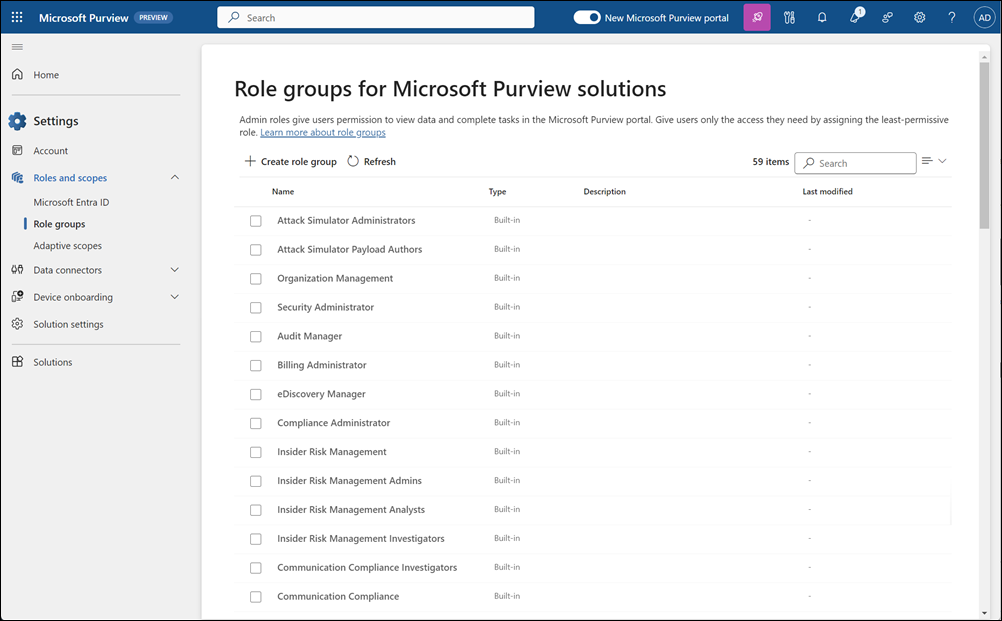
Why “Out of the Box” Roles Aren’t Enough
Microsoft provides basic role groups, but they rarely match real-world enterprise workflows.
The “Compliance Administrator” Paradox
The default Compliance Administrator role is too broad for day-to-day operations but too narrow for full implementation. It gives users power over retention policies (which can delete data) but often lacks the nuance required for granular DLP tuning.
The “Insider Risk” Blind Spot
Implementing Insider Risk Management (IRM) requires a delicate balance. You need HR to see the risk (e.g., “Employee X is leaking data”) without letting HR see the technical logs, and you need IT to fix the logs without seeing the evidence. Default roles blur these lines, creating legal liability.
Effective governance requires distinct “Personas” — not generic admin roles:
The 3-Tier Role Model: Segregation by Design
The Architect
Design Only — Read-Only
- ✓View policy settings and configurations
- ✓Review sensitivity label taxonomy
- ✓Cannot activate or change live policies
The Operator
Deploy Only — Blind to Content
- ✓Activate policies via PIM (Just-in-Time)
- ✓Troubleshoot DLP alerts by metadata only
- ✓Cannot open Content Explorer or read emails
The Auditor
Oversight Only — Cannot Change
- ✓Review all actions taken by Operators
- ✓Access audit logs and compliance reports
- ✓Cannot modify any configuration or policy
Note: Achieving this requires custom Role Groups and strict PIM (Privileged Identity Management) scopes that are not documented in standard Microsoft guides.
The “Golden Role” Strategy: The Privacy-Safe Operator
To solve the conflict between “IT needs to fix things” and “IT shouldn’t read my email,” we implement custom roles that don’t exist out of the box.
Example Custom Role: “The Blind Operator”
A custom role we build for Tier-2 Support teams. It allows them to do their job without violating employee privacy.
✓CAN
- ✓View the status of DLP policies
- ✓See which devices are failing
- ✓Check if an email was blocked
- ✓Update policy settings (if approved via PIM)
✕CANNOT
- ✕Open Content Explorer to read blocked emails
- ✕Download the sensitive file that triggered the alert
- ✕Remove themselves from the monitoring Watch List
Stop Giving Away the Keys to the Kingdom
Most organisations default to “Global Admin” because it’s easy. It is also the fastest way to fail a compliance audit.
We help you design a precise RBAC model where users get exactly the access they need — for exactly as long as they need it — and not a second more.
Book a Free Purview AssessmentThe “Silent Mode” Governance Strategy
At New Paradigm Security, we don’t just assign permissions; we build a Governance Framework that satisfies your CISO, your Privacy Officer, and your Works Council.
Our approach separates the “Technical capability” from the “Data visibility”:
Privacy-First Configuration
We configure RBAC so that IT admins can troubleshoot DLP alerts without seeing the payload of the email or file. They see metadata — not content.
Just-in-Time Access
We utilise Azure PIM to ensure that high-level administrative power exists only for the 2 hours it is needed, with a mandatory justification log.
Audit-Ready Reporting
We map every role assignment to GDPR Article 32 requirements, proving to auditors that you have implemented “Technical and Organisational Measures” to limit access.
Configuring RBAC is not about clicking buttons; it’s about translating your legal and HR requirements into technical constraints. A mistake here doesn’t just break the tool — it exposes your organisation to internal data leakage and regulatory fines.
Do not let your IT team “figure it out” with default roles. Secure your Purview environment with a professional Governance Model.
Microsoft Purview Solutions
From data classification to DLP architecture and RBAC governance — discover how we implement Microsoft Purview for enterprises.
View Purview ServicesProtecting Innovation & Patient Trust
How we helped a pharma company secure sensitive data with Microsoft Purview — including full RBAC governance design.
Read the Success Story